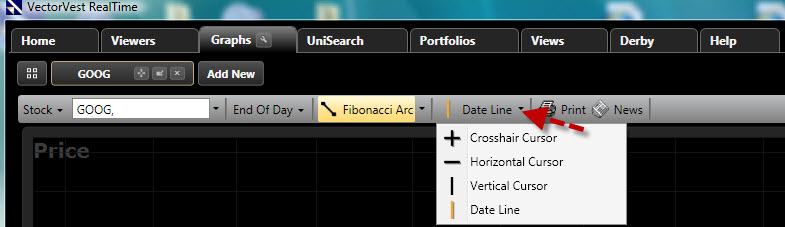
Cursor Types:
There are four cursor choices available in VectorVest RealTime:
Crosshair Cursor: Displays information from both the vertical and horizontal axis of the chart. The data displayed will be for the close of each bar. This is a dynamic cursor that will follow the motions of your mouse.
Horizontal Cursor: Only displays information from the horizontal axis of the chart. This is a dynamic cursor that will follow the motions of your mouse.
Vertical Cursor: Only displays information from the vertical axis of the chart. This is a dynamic cursor that will follow the motions of your mouse.
DateLine Cursor: Displays information in the Parameter List. This is a static cursor. Left click on the data point to display the information for the date or time selected.
Selecting a Cursor:
Left-click the drop down arrow next to the Cursor Button.
Left-click on the cursor you would like to use.
The last cursor choice will be displayed on the Drawing Button. Left-click on the Drawing Button to activate the cursor shown.
Note: You may choose a default cursor using Default Graph Settings.