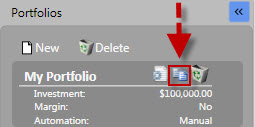
You may rename their portfolios, or make changes to interest, margin, or commission using the Edit Icon or selecting Edit from the Manage Portfolio Menu.
Note: The initial investment amount may not be changed. Cash may be added or withdrawn by using the Manage Portfolio Menu.
Editing Portfolio Settings (Edit Icon):
Left-click the Edit Icon next to the Portfolio you would like to change.
Make the desired changes.
Click "OK".
Editing Portfolio Settings (Manage Portfolio Menu):
Select a portfolio. The selected portfolio will be highlighted on the left side.
Left-click Manage Portfolio on the Local Toolbar.
Click 'Edit Portfolio'.
Make the desired changes.
Click "OK".