Organizing Watchlists
Watchlists may be grouped by category or listed alphabetically. By default, WatchLists will be displayed by group name.
Viewing WatchLists Alphabetically or by Group:
Click the "Viewers" tab on the Main Menu Bar.
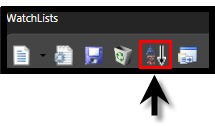
Click the "A-Z" icon on the WatchList Toolbar. (The WatchlList Toolbar is located in the Viewer Directory Panel above the WatchList section.)