Note: Only user-created searches can be renamed.
Renaming a Custom Search:
Select the UniSearch Tab.
Select the Search to rename.
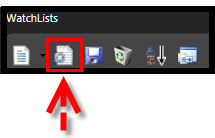
Click the Edit Icon on the Search Directory Toolbar.
Click in the text box labeled "Name" and use the Backspace or Delete key on the keyboard to remove the current name.
Type in the new name for your Search Group.
Click OK.
OR
Select the UniSearch Tab.
Right-click on the search to be renamed..
Click in the text box labeled "Name" and use the Backspace or Delete key on the keyboard to remove the current name.
Type in the new name for your Search Group.
Click OK.