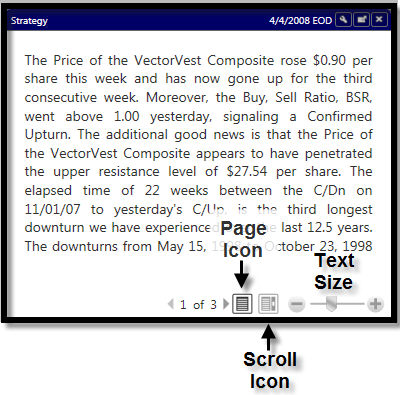
The Strategy section is a daily market review that contains guidance for both prudent and aggressive investors. This section is updated on a daily basis by 8:00 PM ET. VectorVest addresses three types of investors here:
1. Prudent Investors who prefer to buy fundamentally sound stocks and hold them for the long-term. We recommend they go bargain hunting at the beginning of market upturns. They should refrain from buying stocks, protect profits and accumulate cash during Bull Market downturns. They should sell stocks and hold cash during Bear Markets. Bull and Bear Markets are identified in the VectorVest Investment Climate.
2. Aggressive Investors and Traders who buy and sell stocks on a short-term basis with little regard to fundamentals. They are dedicated to using technical analysis to identify entry and exit points for their trades. We suggest they buy stocks long at upturns and sell stocks short at downturns as signaled by the Color Guard Report. We also suggest that they base their trading decisions on what the market is doing at the moment of the trade. These investors should use the Bull and Bear Market scenarios cited in the Investment Climate as background information only.
3. Riding the Wave Investors who are using the VectorVest Market Timing System to identify when to buy and sell stocks. They use VectorVest Strategies to select which stocks to buy long or sell short and the VectorVest Portfolio Manager to manage their portfolio. We example this technique with a Model Portfolio by buying stocks at upturns and selling stocks short at downturns. The Model Portfolio is intended to be used for illustration purposes only and can be found in our end of day program..
This Gadget is customizable. Left-clicking Settings Icon allows you to change the length of the window display.
The Strategy Toolbar:
The Page Icon allows you to move to the next 'page' by clicking the arrows beside the page numbers.
The Scroll Icon allows you to scroll through the Strategy information from beginning to end, rather than click the arrows.
The Text Size Slider allows you to increase or decrease the font size of the Strategy section. Drag the slider to the right to increase the text size, or to the left to decrease the text size. You may also click the + or - buttons on either side of the slider to change the text size.