Creating a New Stock WatchList
Creating a New Stock WatchList:
Select the "Viewers" Tab.
Left-click on a Group in which to save the WatchList, or create a new Watchlist Group.
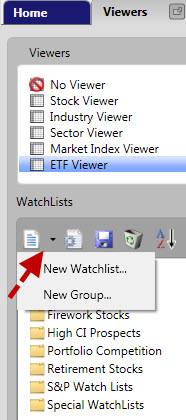
Left-click the drop down arrow next to the New Icon, and select "New WatchList". (see picture below).
Enter a name for the WatchList in the New WatchList Window.
Add any notes about the WatchList to the "Comments" section. This step is optional, but listing the date started, and method used to find the selected stocks can be valuable information for later use.
Left-click the "OK" button.
OR
Select the "Viewers" tab.
Right-click on the Group in which to save the WatchList, or create a new Watchlist Group.
Select "New WatchList".
Enter a name for the WatchList in the New WatchList Window.
Add any notes about the WatchList to the "Comments" section. This step is optional, but listing the date started, and method used to find the selected stocks can be valuable information for later use.
Click the "OK" button.