Creating a New Stock WatchList Group
WatchList Groups provide a way to organize your WatchLlists.
To Create a New Stock WatchList Group:
Select the "Viewers" tab.
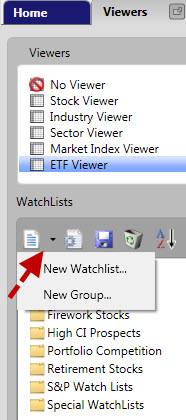
Left-click on the drop down arrow next to the New Icon in the top left of the WatchList section.
Select "New Group..." from the menu that appears. A "New Group" window appears.
Type a name for your WatchList Group.
Click in the text area labeled "Comments" to type any notes about this WatchList Group. This step is optional, but descriptive comments about the purpose of the group can save confusion later.
Left-click "OK" or use the Enter key on your keyboard to save the new group.
OR
Select the "Viewers" tab.
Right-click on any existing Watchlist Group 
Select "New Group" from the menu that appears. A "New Group" window appears.
Type a name for your WatchList Group. Add any notes about the WatchList Group to the "Comments" section. This step is optional, but can provide valuable information for later use.
Left-click "OK" or use the Enter key on your keyboard to save the new group.