
Deleting a Portfolio:
Left-click the Delete Icon next to the Portfolio to be deleted.
Click "Yes" when asked "Are you sure you want to delete this portfolio?". The portfolio will be deleted from the Portfolio Directory.
OR
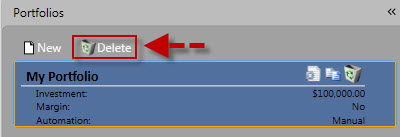
Select the portfolio to be deleted.
Click the Delete Button on the Portfolio Toolbar.
Click "Yes" when asked "Are you sure you want to delete this portfolio?"