Deleting a Stock WatchList
To Delete a Stock WatchList:
Select the "Viewers" tab.
Left-click on the group containing the WatchList to be removed.
Left-click on the name of the WatchList to be deleted.
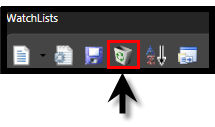
Left-click on the Delete Icon on the WatchList Directory Toolbar.
You will now be prompted, "Are you sure you wish to delete this WatchList?"
Left-click "Yes" to completely remove the WatchList or click "No" to cancel this operation.
OR
Select the "Viewers" tab.
Left-click on the Group containing the WatchList to be removed.
Right-click on the name of the WatchList to be deleted..
You will now be prompted, "Are you sure you wish to delete this WatchList?"
Left-click "Yes" to completely remove the WatchList or click "No" to cancel this operation.