Deleting a Stock WatchList Group
To Delete a Stock WatchList Group (User-created only):
Select the "Viewers" tab.
Left-click on the name of the WatchList Group to be deleted.
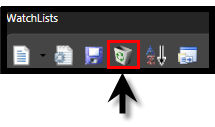
Left-click on the Delete Icon at the top of the WatchList Section. You will be prompted "Are you sure you want to delete this group and all of its contents?"
Click "Yes" to remove the WatchList Group and all associated Watchlists, or "No" to cancel the action.
OR
Select the "Viewers" tab.
Right-click on the name of the WatchList Group to be deleted.
Select "Delete" from the Options Menu that appears. You will be prompted "Are you sure you want to delete this group and all of its contents?"
Click "Yes" to remove the WatchList Group and all associated WatchLists, or "No" to cancel the action.