Renaming a Stock WatchList
Renaming a Stock WatchList:
Select the Stock WatchList that you would like to rename.
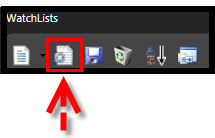
Click the Edit Icon on the Watchlist Toolbar.
Remove the old name by using the delete or backspace key on the keyboard.
Type the new WatchList name.
Left-click "OK".
OR
Right-click on the name of the WatchList that you would like to rename.
Select "Edit" from the Options Menu.
Remove the old name by using the delete or backspace key on the keyboard.
Type the new WatchList name.
Left-click "OK".
Note: Only user-created WatchLists can be renamed.