

Introducing

Options Launchpad
The power of options. Without the complexity.
Find a promising stock with VectorVest. Then let Options Launchpad automatically evaluate the options and display strategies worth considering, without digging through chains, strikes, expirations or volatility data.
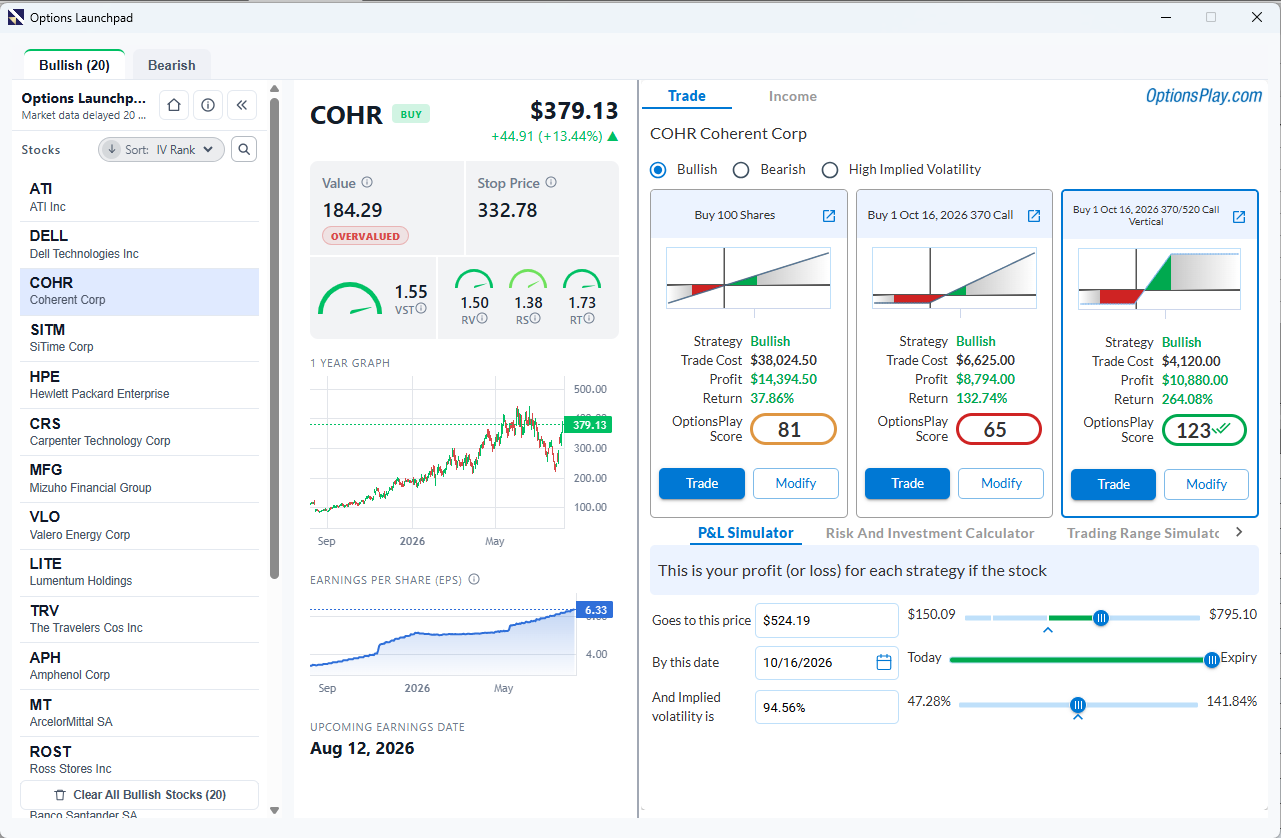
Strong setup ✓
The missing link
Finding the stock was only half the work.
Once you found a stock you liked, you still had to sort through expirations, strikes and strategies to figure out how you wanted to trade it.
Options Launchpad does that work for you. It analyzes the options and gives you a short list of trades to review, with the risk and reward right there on the screen.
- Search one ticker and expiration at a time
- Compare strikes and strategies manually
- Work through risk and reward on your own
- Piece together the trade before placing it
- Start with stocks already identified in VectorVest
- Review a short list of trades to compare
- Keep risk and reward right in front of you
- See the trade details clearly before you decide
How it works
From a VectorVest stock idea to an options trade in a few clicks.
Find the stock with VectorVest. Then let Options Launchpad help you figure out how you want to trade it.
Find the Stock
Start with the stocks you want to analyze. Choose from VectorVest's top-ranked stocks, one of your watchlists, or the results of any search.
Choose Your Outlook
Tell Options Launchpad what you want to do: trade a bullish or bearish move, generate income, or protect a position.
Compare Strategies
Compare option trades side by side. See the cost, risk and reward, profit potential, and OptionsPlay Score for each one.
Model the Trade
Run what-if scenarios to see how changes in price, time, or volatility could affect the trade before you decide whether to place it.
See it in action
Three screens.One connected decision.
See how a stock idea moves from VectorVest into options analysis, strategy comparison and trade modeling.
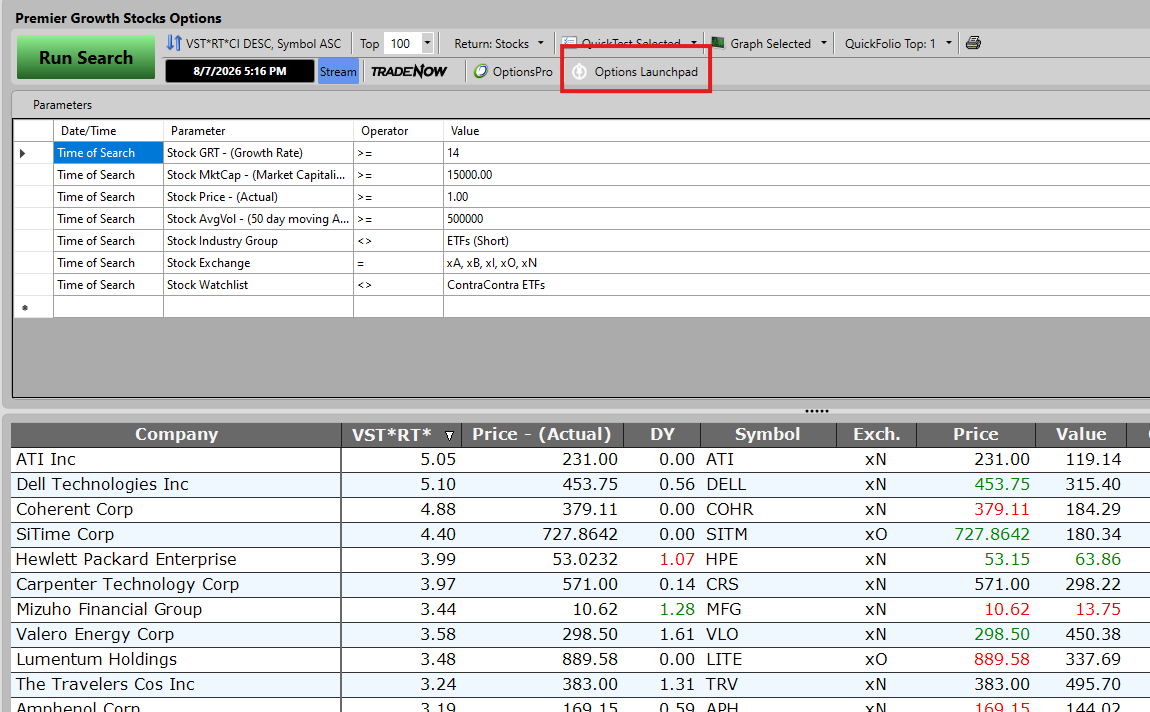
Find the stock
Start with VectorVest's top-ranked stocks, one of your watchlists, or the results of any search. Options Launchpad is available directly from the toolbar.
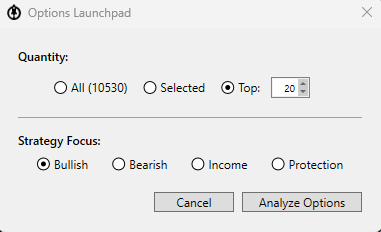
Choose what you want to do
Select the stocks to analyze, then choose Bullish, Bearish, Income or Protection. One click moves the list into options analysis.
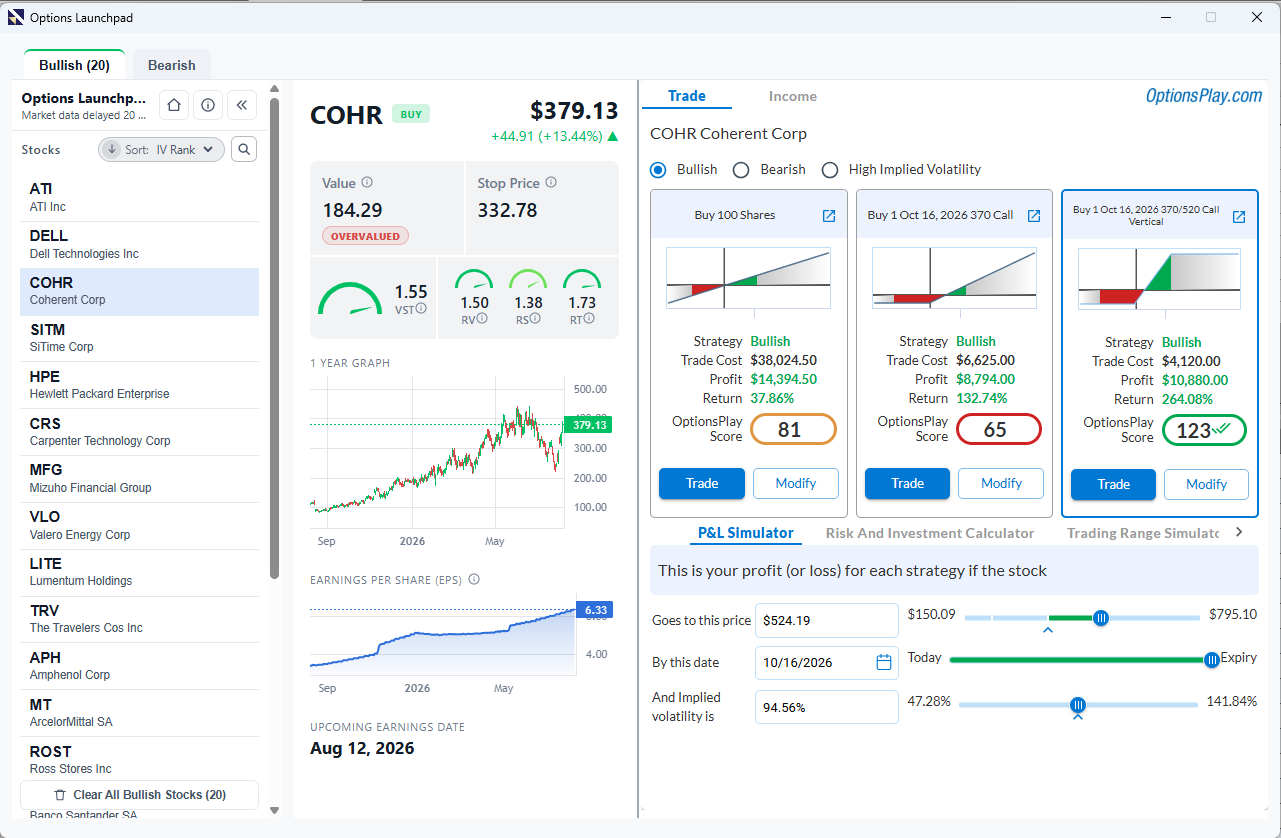
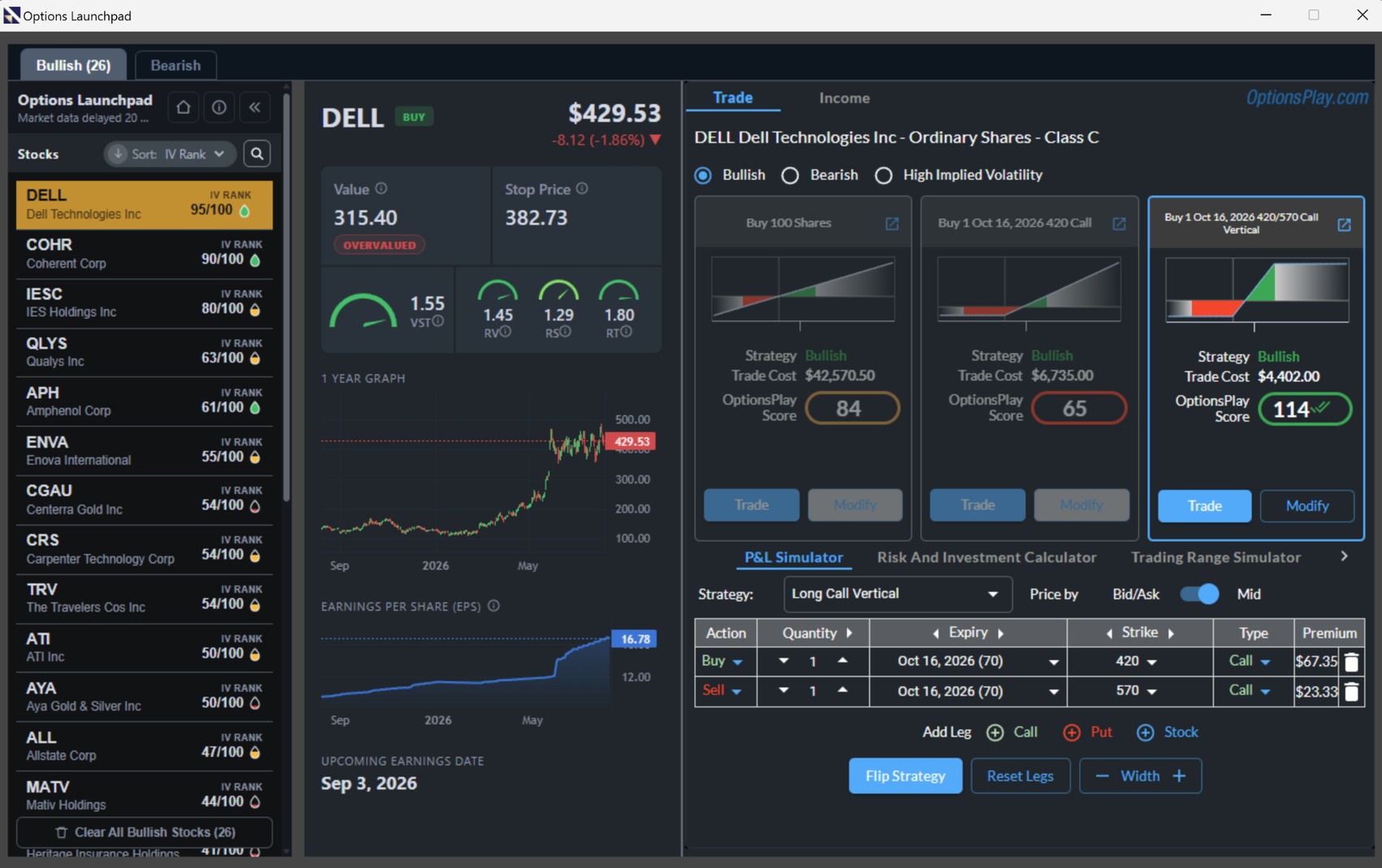
Compare and model the trade
Compare option trades with the cost, risk, reward and OptionsPlay Score in view. Then run what-if scenarios in the P&L Simulator.
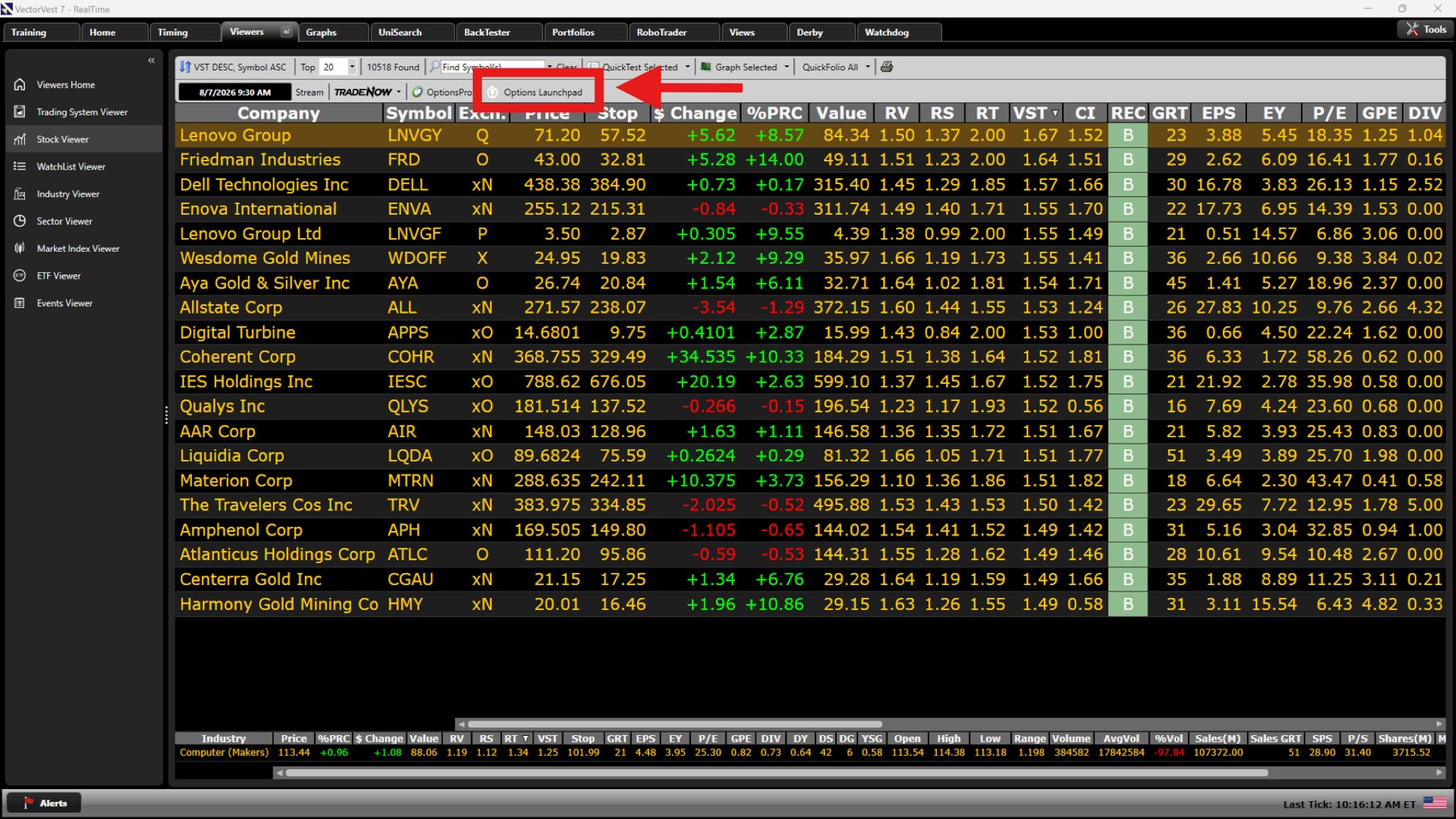
Start with your list
Stop checking stocks one at a time.
Start with a VectorVest list, watchlist, or search. Options Launchpad analyzes the stocks together and puts the option trades in one place, so you can quickly see which ones you want to look at more closely.
Instead of opening an options chain for every ticker, look across the whole list first, then spend your time on the stocks that interest you most.
Start with multiple stocks
Analyze a whole VectorVest list at once instead of checking one ticker at a time.
Compare them in one place
See the option trades for the stocks on your list side by side, so you can quickly decide where you want to focus.
Consistent analysis
Compare every trade using the same framework, with cost, risk, reward and OptionsPlay Score laid out clearly each time.
Compare the tradeoffs
One stock.One outlook.More than one way to act.
There can be more than one way to trade the same stock. If you're bullish, for example, you might buy the stock, buy a call, or use a call spread. Options Launchpad puts those choices side by side so you can compare them before you decide.
Direct stock ownership with the largest capital commitment.
Leveraged upside with defined premium at risk.
Defined risk and reward with a lower upfront cost.
Built-in Strategy Checklist
Check the trade before you place it.
Options Launchpad gives every trade a Strategy Checklist so you can quickly see the things that could affect your decision before you act.
It checks the stock trend, market trend, OptionsPlay Score, upcoming earnings, and the bid/ask spread, all in one place.
Trend Check
See whether the stock and broader market trends support the strategy you are considering.
OptionsPlay Score
Use the OptionsPlay Score as another way to compare the trade with other choices.
Earnings Check
See if the company reports earnings before the option expires.
Spread & Liquidity
Spot wide bid/ask spreads or other liquidity concerns before you place the trade.
A powerful signal, simplified
Let one clear score help cut through the noise.
Options Launchpad displays the OptionsPlay Score beside each strategy. It gives you a simple way to compare trades while keeping the cost, risk and reward visible.
How to read it: a score above 100 is presented as a strong setup, an immediate visual cue that the strategy may deserve closer consideration.
The OptionsPlay Score is an analytical comparison tool, not a guarantee or recommendation.
Ready to place the trade
From choosing the trade to placing it.
Once you've found the stock and chosen the options strategy, Options Launchpad helps you through the final decisions before you place the trade.
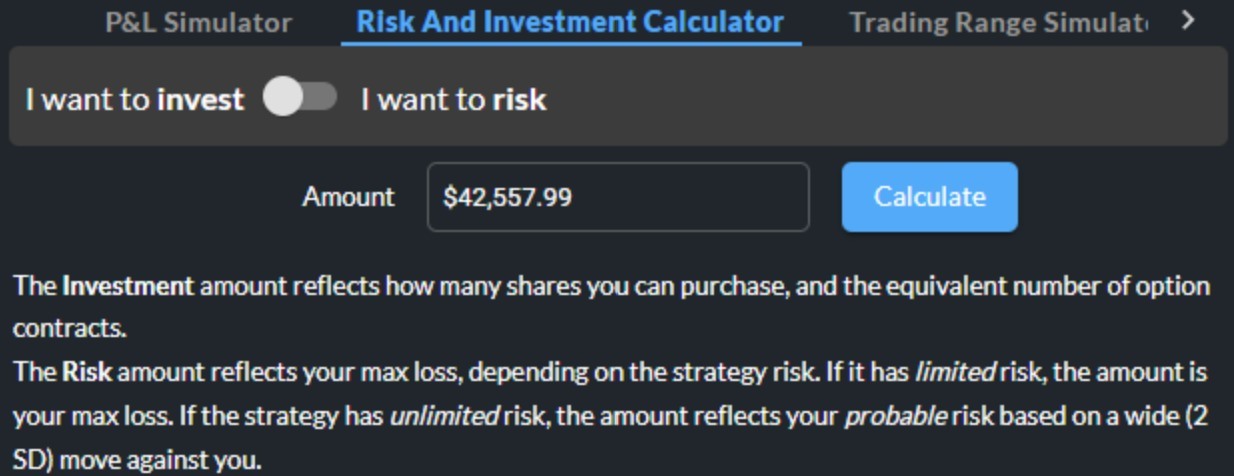
Tell Launchpad how much you're willing to risk.
It calculates the position size for you, so you can see how many shares or option contracts fit the amount you want to risk.
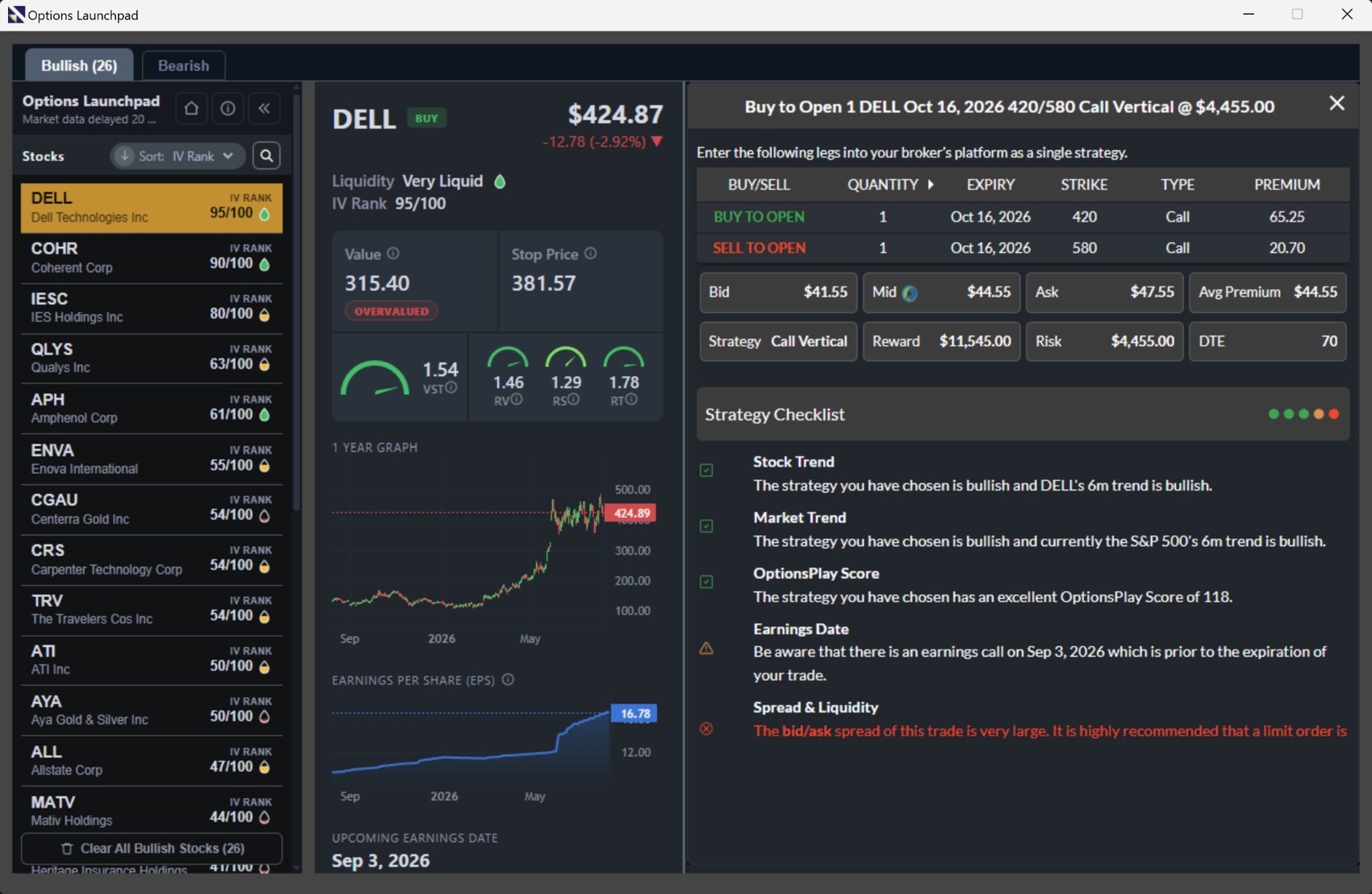
Understand the trade before you place it.
See what you're buying, what needs to happen, what you can lose and how the trade is put together, all in plain language.
When you're ready, Launchpad shows you the order details to enter with your broker.
VectorVest helps you find and evaluate the stock. OptionsPlay technology helps Options Launchpad analyze and compare the option trades.
Questions, answered
Built to make options feel more approachable.
Options still involve risk and tradeoffs. Launchpad is designed to make those tradeoffs easier to see, compare and understand.
Do I need to be an experienced options trader?
No. Options Launchpad is designed to make strategies easier to read and compare with plain-language explanations and visual tools. You should still understand the risks before trading.
Does Options Launchpad place trades for me?
No. The Trade view shows the order details you can enter with your broker; Options Launchpad does not execute the order for you.
What does the OptionsPlay Score tell me?
The score is an analytical comparison tool displayed alongside strategies. It can help identify setups for closer consideration, but it does not guarantee an outcome.
Can I change the suggested strategy?
Yes. Available strategy inputs such as expiration, strikes, quantity and spread width can be adjusted so you can re-evaluate the resulting tradeoffs.
Which Strategy Focus choices are available?
Options Launchpad supports four Strategy Focus choices: Bullish, Bearish, Income and Protection.
How does the 30-day trial work?
The introductory trial provides 30 days of full Options Launchpad access as part of a special promotional offer. Options Launchpad requires an active VectorVest 7 subscription. After the trial, monthly VectorVest 7 customers are billed $69 per month and annual VectorVest 7 customers are billed $695 per year. The Options Launchpad billing frequency automatically matches the billing frequency of your VectorVest 7 subscription.
Find the stock. Launch the strategy.
Try Options Launchpad for 30 days.
See how Options Launchpad takes you from a VectorVest stock idea to option trades you can compare, model and understand before choosing what to do.
- Available as an add-on for active VectorVest 7 customers
- Move directly from a VectorVest stock idea into options analysis
- Explore Bullish, Bearish, Income and Protection strategies
- Use the OptionsPlay Score to identify stronger setups more quickly
- Model price, date and volatility assumptions with the P&L Simulator
VectorVest 7 is required.
Options Launchpad is an add-on product. You must have an active VectorVest 7 subscription to purchase and use it.
Your billing follows VectorVest 7.
After the 30-day trial, your Options Launchpad subscription automatically renews on the same schedule as your VectorVest 7 subscription.
Options Launchpad billing frequency cannot be selected independently.